Announcement

Showing posts with label jquery. Show all posts

Thursday, December 4, 2014

Json Size Limit


json size limit techiners
This post will highlight a very common error that comes often when we visit a webpage/website that uses AJAX. We know that in AJAX we have anonymous functions like: success, error etc. success gets called when our ajax request gets successfully completed and it returns a response whereas error gets called when ajax encounters a problem in processing a request.

Thursday, November 6, 2014

How to create a pop up window

Create a pop up window

create a pop up window using jquery in mvc4 techiners.in
Sometimes in our application we need to take input dynamically from the user such as when a user tries to submit a form which contains a drop down for selecting a Country that is mandatory, but the Country is not present in the drop down list which the user wants to select. If this is the case, than probably user will select any country in order to get rid of the error message of selecting mandatory country. There must be a way to dynamically add new country. So, In this post we will learn how to create a pop up window using jquery that will allow the user to add new country simultaneously loading it into drop down and make available for selection.

So, let us begin our step-by-step procedure to add a pop-up so that the user need

Monday, June 9, 2014

Check all check box on the click of a single check box.

Following is the code to select all the check boxes on the click of a single check box.


$("input[name='checkboxes']").click(function () {
if ($("input[name='checkboxes']").length == $("input[name='checkboxes']:checked").length) {
$("#checkAll").attr("checked", "checked");
}
else {
$("#checkAll").removeAttr("checked");
}
});

$("#checkAll").click(function () {
$("input[name='checkboxes']").attr("checked", this.checked);
});


checkboxes is the name given to all the check boxes that need to be checked on the click of a single check box.

checkAll is the ID of the single check box on the click of which all check boxes will get checked/unchecked.

Wednesday, April 30, 2014

How to trigger button click in MVC4?

How to trigger button click in MVC4?

This post will let you know to handle the click event of button when Enter Key is hit by the user.

A function keypressHandler() is created in which we need to check whether the key hit by the user is Enter Key or not. If it is, then get the focus on the login button and trigger the click event.

This keypressHandler() function should be called from the form whenever any key is pressed.

In the example code below, we have assumed the id of the form as 'loginForm'. You can replace it with your own form Id.


function keypressHandler(e){
if (e.which == 13) {
$(this).blur();
$('#Loginbutton').focus().click(); //give your submit button an ID
}
}

$('#loginForm').keypress(keypressHandler); //give your form an ID

How to prevent the functionality of browser back button?

Prevent the functionality of browser back button

In this post I will teach you how to prevent the functionality of browser back button.

Since, we have to prevent the back functionality of the browser, this can't be handled from the code-behind. This is the client functionality. So we need to so something at the client side.

So, we simply have to use javascript history object which is a part of the window object.

history object has 3 methods and 1 property.

history object methods:
  • forward()- loads the next URL in the history list. It won't work if the next page does not exist in the history list.
  • back()- loads the previous URL in the history list. It won't work if the previous page does not exist in the history list.
  • go()- loads the specific URL from the history list. It accepts either int parameter or string parameter.
history object property:
  • length- returns the number of URL in the history list.
I have created a javascript function where I have redirected the user to the current page using window.history.forward() method.


/*This is the function*/
function disableBackButton() {
window.history.forward()
}
/* call the function */
disableBackButton();

/* when the page loads again call the function */
window.onload=disableBackButton();

/* if the page is persisted than disable the back functionality */
window.onpageshow = function (evt) {
if (evt.persisted) disableBackButton()
}

/* do nothing on unload */
window.onunload = function () { void (0) }


NOTE: Place this code in the <script type=text/javascript></script> tag. The code should be placed on the page where the user see Log Out button.

Thursday, April 3, 2014

How to find if radio button is checked or not?

This post will explain how to get the checked item from radio button. It will determine if radio button is checked or not.

This is done using jquery as follows:

$('#RadioButtonId').is(':checked')

Wednesday, March 26, 2014

How to get checked items using jquery?

This DeleteGraphicsFromClip() function is called on the click event of Delete button whose id is deleteGraphicsFromClip.

The function will iterate over all the check boxes present in the form or in table <td> tag using jquery as $('input[name=chkDelete]:checked').each(function (){...}.

If the check box is checked, then get the id of the checked checkbox and set the flag to 0.

If there are no checked checkboxes, then set the flag to 1 for displaying error.

ids is declared as an array, and hence we use push method to insert the id of the checked checkbox.

Finaly, if the flag is 0, then do the required operation as passing the all checked ids to the controller for deleting the records. If the flag is 1, then display alert to the user to select atleast one checkbox for deleting.

 function DeleteGraphicsFromClip() {
        var ids = [];
        var flag=1;
        $('input[name=chkDelete]:checked').each(function () {
            if ($('input[name=chkDelete]:checked').length <= 0) {
                flag = 1;
            }
            else {
                ids.push($(this).attr("id"));
                flag = 0;
            }
        });
        if (flag==0) {
            alert('checked: ' + ids);
            flag = 1;
        }
        else {
            alert('Please select graphics to delete');
            flag = 1;
        }
    }

Friday, March 21, 2014

How to prevent the default action of submit button?

This is my submit button with id as "btnSubmitModification" .

We need to prevent the default action of this submit button i.e., to prevent the
form from submission on click of this button.

<input type="submit" class="button" id="btnSubmitModification" value="Save"/>

Here is the code in script tag.
This is achieved using jquery.

We handle the click event of submit button and pass the parameter to the
event handler function as e.

This is parameter is than used to prevent the default action of submit button i.e., to
prevent the form from submission.

Just write e.preventDefault(); and you are done.

<script type="text/javascript">
    $('#btnSubmitModification').click(function (e) {
        if ($("#txtName").val() != "" && $("#txtName").val() != null) {
            // write your further code here.
            return true;
        }
        else {
            alert('Please enter name.');
            e.preventDefault();
        }
    });
</script>

Alternative way to do the same thing is as: Just write return false and don't pass any
argument to the function.

<script type="text/javascript">
    $('#btnSubmitModification').click(function () {
        if ($("#txtName").val() != "" && $("#txtName").val() != null) {
            // write your further code here.
            return true;
        }
        else {
            alert('Please enter name.');
            return false;
        }
    });
</script>


Tuesday, March 18, 2014

Add items from one drop down to another drop down using jquery

1. Define a function that will move items from one drop down to another drop down.

2. This function will be called on the click of buttons i.e., Button for removing item and Button for       adding item.

3. The function accepts two parameters i.e., fromDropdown and toDropdown. It will move items           from fromDropdown to toDropdown.

4. The .off() method removes event handlers that were attached with .on(). See the discussion of         delegated and directly bound events on that page for more information. Calling .off() with no           arguments removes all handlers attached to the elements. Specific event handlers can be                 removed on elements by providing combinations of event names, namespaces, selectors, or             handlers function names.
 
    It basically removes an event handlers. For more information Click here.

Function for adding and removing items from one drop down to another drop down.

   function cutAndPaste(from, to) {
        $(to).append(function () {
            return $(from + " option:selected").each(function () {
                this.outerHTML;
            }).remove();
        });
   }

On click of Add button.

    $("#btnAdd").off("click").on("click", function (e) {
        var itemExists = false;
        var txt = $("#fromDropDown").val();
        e.preventDefault();
        $("#toDropDown option").each(function () {
            if ($(this).val() == txt) {
                itemExists = true;
                alert('Items already exists.');
                return false;
            }
        });
        if ($('#fromDropDown').val() == null) {
            alert('Item list is empty.')
        }
        if (!itemExists) {
            cutAndPaste("#fromDropDown", "#toDropDown");
        }
    });

On click of Remove button.

    $("#btnRemove").off("click").on("click", function (e) {
        var itemExists = false;
        var txt = $("#toDropDown").val();
        e.preventDefault();
        if ($("#toDropDown :selected").val() > 0) {
            cutAndPaste("#toDropDown", "#fromDropDown");
        }
        else {
            alert('Item does not exists');
            return false;
        }
    });

Friday, March 14, 2014

Get the total number of items of drop down using jquery


DropDownId is the id of the DropDown whose items you would like to count.

var items = $('#DropDownId>option').length;

Sunday, February 2, 2014

Export table data to excel using jquery


Export table data to excel using jquery

Export DataTable to Excel ©techiners
Export DataTable to Excel


To export data table to excel using jquery just add following code:


$('#btnExcel').click(function (e) {

window.open('data:application/vnd.ms-excel,'+$('#dvData').html());
e.preventDefault();


Explanation: #btnExcel is the id of the button on the click of which you need to export the data to the excel file. #dvData is the id of the DIV element in which data is present or rendered on the view that needs to be exported to excel file.

Monday, January 20, 2014

How to display Search Box of jquery datatable at the bottom of the table?


To display the search box of jquery datatable at the bottom of the table use "sDom" parameter as follows:


"sDom": '<"top"i>rt<"bottom"flp><"clear">'

where "top", "bottom" and "clear" are the classes of the div where the text box will render in.


Friday, January 17, 2014

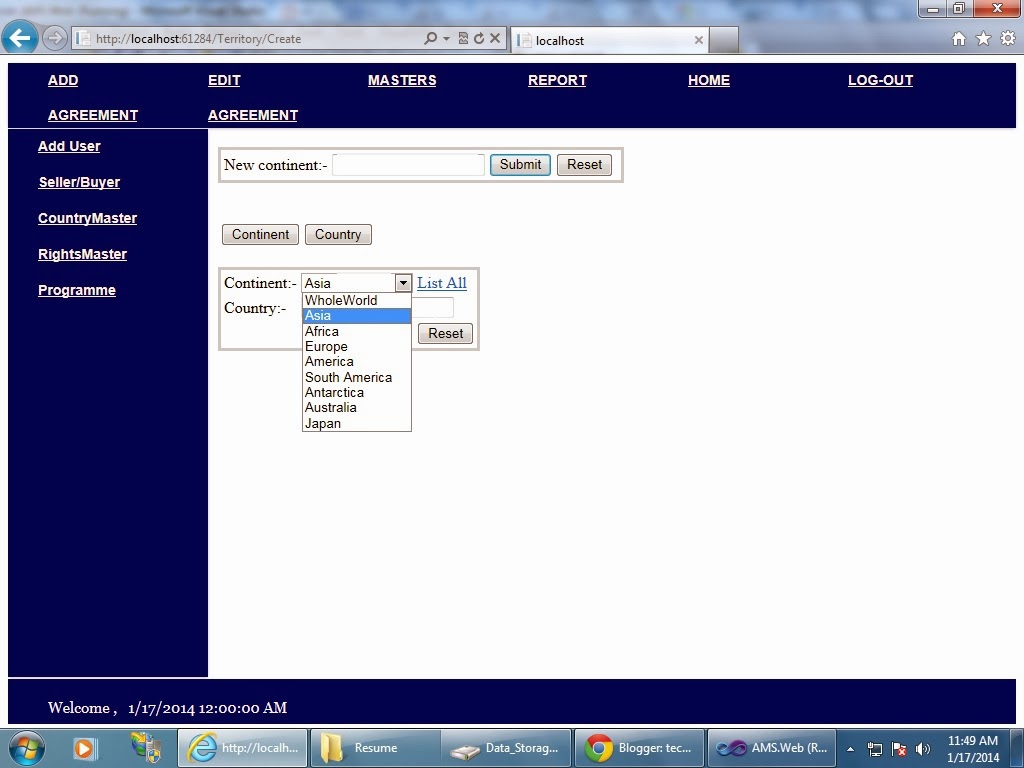
Adding country into the selected continent from drop down via ajax. ajax.success method was not being called.


While working on a project, we were given a task to show the countries of selected continent from drop down box and bind it to another drop down box as well as display it in a view. But, I got stuck at a point where my AJAX success method was not called. The code in the controller was perfect. The problem is because project is running on the IIS server.


So how to resolve it? Solution is right click